
目标:将teacher.db转换成html格式文档
[root@ilovelluvia re]# cat teacher.db
J Luo:Southeast University:Nanjing:china
Y Zhang:Victory University:Melbourne:Australia
D Hou:Beijing university:Beijing:China
B Liu:Shanghai Jiaotong University:Shanghai:China
C Lin:University of Toronto:Toronto:Canada
C Ju:University of Beijin Hangkong Hangtian:Beijin:China
[root@ilovelluvia re]# cat txttohtml.sh
脚本:
[root@ilovelluvia re]# cat txttohtml.sh
#!/bin/bash

cat << CLOUD
<html lang="en">
<head>
    <meta charset="UTF-8">
    <title>Title</title>
</head>
<style type="text/css">

        table{
            border-collapse: collapse;
        }
        table,th,td{
            border:1px,solid,black;
        }

</style>
<body>
<table border ="1">
    <thead>
        <tr bgcolor="#FFD700">
            <th>姓名</th>
            <th>大学</th>
            <th>城市</th>
            <th>国家</th>
        </tr>
    </thead>
    <tbody>
CLOUD

#以下2个方法都OK
#sed -e 's/:/<\/td><td>/g' -e 's/^/<tr><td>/g' -e 's/$/<\/td><\/tr>/g'
#awk 'BEGIN {FS=":";OFS="</td><td>"} gsub(/^/,"<tr><td>") gsub(/$/,"</td><tr>") {print $1,$2,$3,$4}'

cat  << CLOUD
</tbody>
</table>
</body>
</html>
CLOUD
执行:
[root@ilovelluvia re]# sh txttohtml.sh <teacher.db> teacher.html
#执行txttohtml.sh 将teacher.db重定向到stdin,stdout重定向到teacher.html
查看:
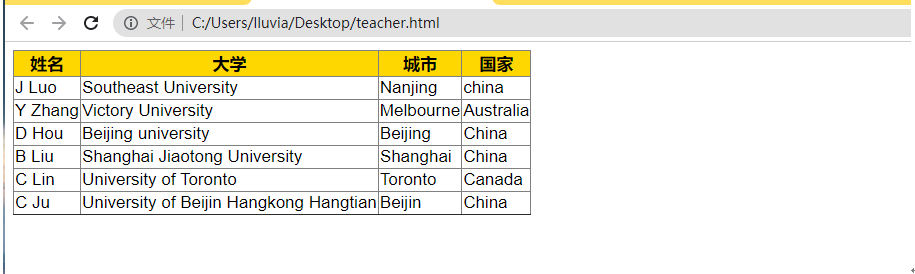
文本文件转化为HTML文件